


TL;DR: Why Early-Stage Startups Should Use Markdown
Markdown is a lightweight, plain-text formatting tool that simplifies content creation and boosts efficiency for startups. It streamlines workflows by enabling fast document formatting, seamless integrations with tools like N8N or GitHub, and compatibility with automations and large language models (LLMs).
• Speeds up formatting without relying on complex software
• Structures content for AI tools like ChatGPT and APIs
• Improves team collaboration with easy-to-read, machine-parsable text
New to Markdown? Top Markdown Apps for Small Businesses can get you started! Streamline your workflows with Markdown to save time and future-proof your content strategies.
Check out startup news that you might like:
Startup News: Best Steps & Hidden Benefits of Mastering LLM Visibility in 2026
Startup News Revealed: Hidden Benefits and Insider Steps for Sustainable Growth in 2026

Markdown is a lightweight markup language designed to make text formatting simple and accessible, particularly for tech-savvy entrepreneurs and developers.
First time I heard about it was years ago from one of my technical team members and I never paid any attention to it as it didn’t seem that important.
We even made an internal tool to write funding applications so that the whole team could collaborate and I still couldn’t understand why we even needed markdown for it.
It felt like a waste of time to learn a new syntax and I never go into it.
Until GPT 3 showed up and I started hearing the word markdown everywhere.
That’s when my understanding and appreciation of the format really happened.
Now it’s my go to format and in 99% of cases I create documents and keep the document blueprint in markdown. The other 1% is for WordPress, as it turns out WordPress automation is better of with the WordPress-adjusted html.
Markdown’s compatibility with various platforms and tools has made it a universal format, especially in the realm of automations and integrations with large language models (LLMs). For bootstrapped startups and solopreneurs like myself, Markdown represents a game-changing yet straightforward way to boost efficiency and create structured content without diving into complex coding.
Why would a minimalist markup language matter to a startup? The answer lies in how Markdown simplifies workflows, from creating collaborative documents to feeding structured datasets into automations or even building technical repositories. Large language models (LLMs), such as ChatGPT, often benefit from Markdown’s neatly organized structure, making it easier to parse and generate accurate outcomes. Its low barrier to entry makes it the perfect tool for founders juggling multiple tasks without time for steep learning curves.
📊 Why Startups Should Care About Markdown
Working on multiple ventures, I’ve seen firsthand how tools like Markdown can eliminate much of the unnecessary overhead associated with content formatting or handling multichannel automations. Startups are inherently resource-constrained, and Markdown’s ability to “standardize” content preparation solves an underrated problem: time wastage.
- Speed: Format documents quickly without relying on bulky word-processing software.
- Simplicity: Write with plain text and still achieve professional formatting results.
- Interoperability: Compatible with automation tools like N8N, Make.com, GitHub, and documentation platforms like Jekyll or ReadTheDocs.
- Scalability: Markdown files can seamlessly integrate into workflows involving APIs or machine-learning models.
- Future-proof format: If you write blog posts and keep the original markdown copy, anytime in the future you can go back to it, as it’s easy to transform into any other format (if you need to publish it somewhere else) or feed it to your LLM (to create an updated version of the article), as I would do in my Minimum Viable Articles workflow.
🔍 What Makes Markdown Ideal for Automations and LLMs?
One of the main reasons Markdown is thriving in 2026 is its applicability in powering automations that interpret structured text. Let me explain how Markdown fits into this ecosystem:
- Human Readability: Markdown is inherently easy to understand for non-programmers while remaining machine-parseable, ideal for settings where team members with varying levels of technical expertise work together. Unlike J-SON, lol.
- Structured Input for LLMs: Combining Markdown’s clean syntax with LLMs helps craft better queries, responses, or documentation.
- Multi-Purpose Formatting: A Markdown file can act as a blog post, an email template, or training data for an AI model, all within the same structure.
- Version Control: Markdown files are easily managed using Git repositories, a must-have for any evolving startup team.
Example: Imagine you’re preparing FAQs as onboarding materials for a SaaS platform. Using Markdown, you could write clean, structured text that can later be used to populate a help center, a chatbot knowledge base, or written guides, all automatically generated. This dramatically reduces repetitive work, something we founders rarely have time for!
📋 How to Get Started With Markdown: A Step-by-Step Guide
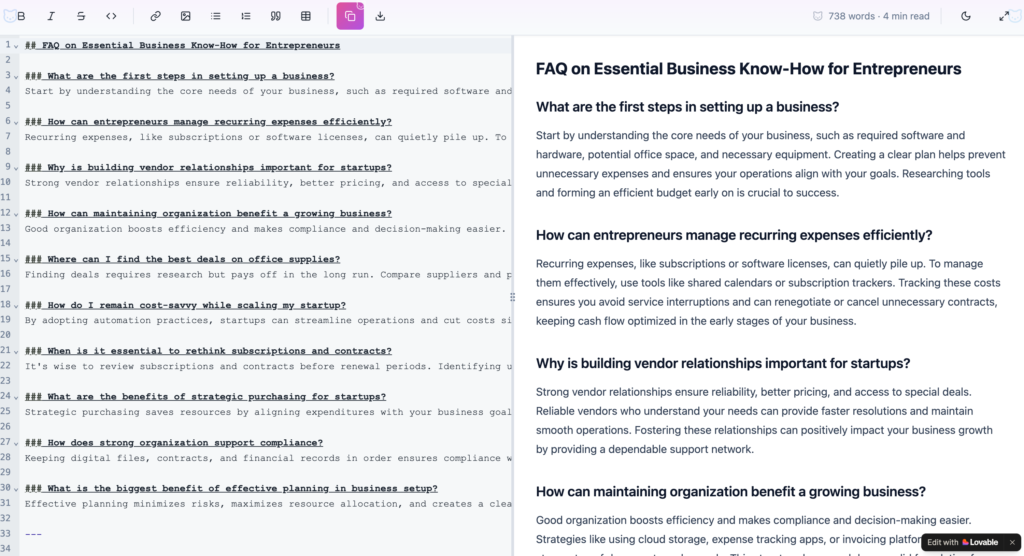
If you’re new to Markdown or unsure about incorporating it, follow this simple process to integrate the format into your startup’s daily workflows:
- Pick a Markdown Editor: Try beginner-friendly tools like Typora for writing or Visual Studio Code if you require technical extensions. NB. I eventually built my own markdown editor using Lovable, because I needed a specific feature that no other tool had. It took me 10 minutes and I’m using the tool multiple times a day.
- Learn the Basic Syntax: Familiarize yourself with headers (#), bold (**), link insertions, and lists.
- Experiment with Files: Start by converting an existing Google Docs document to Markdown (most Markdown editors can do this) and observe how it translates. Btw, make sure to install a markdown extension for Google Docs so you can go back and forth. A massive time-saver.
- Integrate Automations: Use platforms, like N8N or Make, to auto-generate files or transform Markdown into PDFs, blog posts, or emails.
- Adopt Markdown for Documentation: Platforms like GitHub support Markdown, so consider storing your startup’s operational playbooks there.
🏆 Best Practices for Using Markdown in Startups
- Use Templates: Create reusable Markdown templates for FAQ pages, blog articles, and emails.
- Embed Metadata: Add tags or instructions that tools in your automation chain can handle (e.g., YAML metadata for Jekyll sites).
- Validate Syntax: Employ tools like MarkdownLint to ensure consistent formatting across team documents.
- Combine with APIs: Integrate Markdown into APIs enabling dynamic rendering, such as markdown-to-HTML pipelines, to enhance scalability.
Pro tip from my startups: Maintain a centralized repository of Markdown files so growth-stage team members don’t repeatedly reinvent content or formatting rules.
⚠️ Common Markdown Mistakes and How to Avoid Them
- Overcomplicated Files: Trying to add too much CSS or customization can clutter Markdown’s simplicity.
- Skipping File Naming Standards: Use clear, descriptive names for Markdown files so that automated workflows don’t break.
- Neglecting Collaboration: Markdown is excellent for teamwork, but ensure team members stick to a style guide to maintain uniformity.
- Not Backing Up Files: Always sync Markdown workflows to a version control system.
🚀 Conclusion: Is Markdown the Right Solution for You?
If you’re an entrepreneur seeking ways to lighten your workload and streamline automations while fostering team collaboration, Markdown should absolutely be in your toolkit. Its versatility, paired with the increasing reliance on large language models, future-proofs your startup’s content pipelines. Always remember: simplicity scales.
Just start using it; you’ll never look back.
People Also Ask:
What is Markdown used for?
Markdown is a lightweight markup language employed to craft and edit technical documents. It lets users write in plain text with special characters for features like headers, bullets, and bold text.
What is an example of Markdown?
An example of Markdown involves adding symbols for styling, such as using a number sign for a heading (# Heading One) or using double asterisks for bold text (**bold text**). Bullet points use - or *, and links are created with the format [Link Text](URL).
What is the concept of Markdown?
Markdown refers to a lightweight markup language designed by John Gruber in 2004 for formatting plaintext documents. It is widely appreciated for its readability, portability, and universal support in applications.
Is Markdown the same as HTML?
Markdown is simpler to write and read than HTML, but it is less expressive. While HTML supports more specific formatting and semantic tagging, Markdown focuses on ease and simplicity for users creating plaintext documents.
How does Markdown simplify documentation?
Markdown allows users to focus on content rather than form by employing easy-to-understand symbols for text formatting, significantly reducing the need for HTML tags while writing documentation or web content.
How can Markdown be converted to HTML?
Markdown documents can be easily converted into HTML with tools like Markdown editors or converters. This conversion ensures compatibility for web-based presentations.
Where is Markdown commonly used?
Markdown is widely utilized across platforms like GitHub for README files, technical writing, blogging, messaging in apps like Slack, and creating static websites due to its simplicity and versatility.
What are Markdown symbols used for?
Symbols in Markdown include # for headings, * or _ for emphasis (italic or bold), - or * for lists, and [Text](URL) for hyperlinks. These symbols make plaintext visually formatted text accessible.
Who created Markdown?
Markdown was created by John Gruber in 2004 as a simpler alternative to HTML for formatting text documents. His approach has since become widely adopted globally.
Why is Markdown popular among developers?
Markdown is favored for its readability, ease of use, and support across diverse platforms. It simplifies the process of drafting technical documentation and allows for effortless creation of styled documents.
FAQ on the Role of Markdown in Startups and Automations
How can Markdown improve workflow automation in startups?
Markdown simplifies creating structured content, making it easier to integrate with automation tools like Zapier or Make. Startups can transform Markdown into documents, emails, or APIs seamlessly, reducing time spent on formatting and repetitive tasks. Check out AI Automations for Startups.
What are the key benefits of Markdown for large language models (LLMs)?
Markdown’s structured syntax enhances LLM interactions by providing clear, machine-parseable input. It improves accuracy in generating responses or processing data for complex workflows. Explore how to structure the best prompts with Markdown for LLMs.
Which Markdown editors are ideal for small businesses?
Small businesses prefer editors like Typora, Obsidian, and Bear for their simplicity, rich features, and productivity enhancements. Each tool suits different use cases, from document creation to task management. Discover top apps for fundamental Markdown integrations.
How does semantic authority relate to Markdown usage in startups?
Using Markdown can help startups plan and organize high-quality, semantically connected content for blogs, FAQs, and playbooks, enhancing their niche authority and scaling efficient content pipelines. Learn strategies to build semantic connectivity with content.
Are there open-source Markdown tools for technical diagrams?
Yes, tools like Mermaid and Draw.io support creating diagrams with Markdown for technical documentation, making complex concepts easier to communicate without expensive software. Find alternatives to premium diagramming tools.
How can startups integrate Markdown with design documentation?
Using Markdown along with tools like Notion or Google Docs lets startups align technical and design documentation in a user-friendly, centralized manner, reducing workflow fragmentation. Explore free tools for design-focused documentation.
What’s the role of metadata in Markdown workflows?
Metadata, including YAML headers, enhances Markdown’s compatibility with automations and content collation. It enables dynamic integration into platforms like GitHub or blog generation tools like Jekyll. Dive into scalable content frameworks using metadata.
How does Markdown enhance remote team collaboration?
Markdown’s plain text format ensures simplicity and compatibility across editors, facilitating version control on Git and seamless collaboration among teams with varying technical skills. Gain insights on remote collaboration tools and strategies.
What pitfalls should be avoided when using Markdown for automations?
Overloading Markdown with unnecessary custom CSS or poorly structured files can hinder workflows. Adopting syntax validators like MarkdownLint ensures consistent formatting for automation readiness.
How scalable is Markdown for startups with limited resources?
Markdown’s low resource requirements and compatibility with APIs make it a scalable solution, particularly for startups managing lean operations. Automation-friendly and cross-platform, it saves time while enhancing precision in task execution. Optimize operations with scalable Markdown frameworks.
About the Author
Violetta Bonenkamp, also known as MeanCEO, is an experienced startup founder with an impressive educational background including an MBA and four other higher education degrees. She has over 20 years of work experience across multiple countries, including 5 years as a solopreneur and serial entrepreneur. Throughout her startup experience she has applied for multiple startup grants at the EU level, in the Netherlands and Malta, and her startups received quite a few of those. She’s been living, studying and working in many countries around the globe and her extensive multicultural experience has influenced her immensely.
Violetta is a true multiple specialist who has built expertise in Linguistics, Education, Business Management, Blockchain, Entrepreneurship, Intellectual Property, Game Design, AI, SEO, Digital Marketing, cyber security and zero code automations. Her extensive educational journey includes a Master of Arts in Linguistics and Education, an Advanced Master in Linguistics from Belgium (2006-2007), an MBA from Blekinge Institute of Technology in Sweden (2006-2008), and an Erasmus Mundus joint program European Master of Higher Education from universities in Norway, Finland, and Portugal (2009).
She is the founder of Fe/male Switch, a startup game that encourages women to enter STEM fields, and also leads CADChain, and multiple other projects like the Directory of 1,000 Startup Cities with a proprietary MeanCEO Index that ranks cities for female entrepreneurs. Violetta created the “gamepreneurship” methodology, which forms the scientific basis of her startup game. She also builds a lot of SEO tools for startups. Her achievements include being named one of the top 100 women in Europe by EU Startups in 2022 and being nominated for Impact Person of the year at the Dutch Blockchain Week. She is an author with Sifted and a speaker at different Universities. Recently she published a book on Startup Idea Validation the right way: from zero to first customers and beyond, launched a Directory of 1,500+ websites for startups to list themselves in order to gain traction and build backlinks and is building MELA AI to help local restaurants in Malta get more visibility online.
For the past several years Violetta has been living between the Netherlands and Malta, while also regularly traveling to different destinations around the globe, usually due to her entrepreneurial activities. This has led her to start writing about different locations and amenities from the point of view of an entrepreneur. Here’s her recent article about the best hotels in Italy to work from.

